Solitaire Word Match
One Way StreetWord
4.9169.00 Reviews
- Version
- 1.2.2
- Installs
- 100.00K
- Age Rating
- Everyone
Screenshots
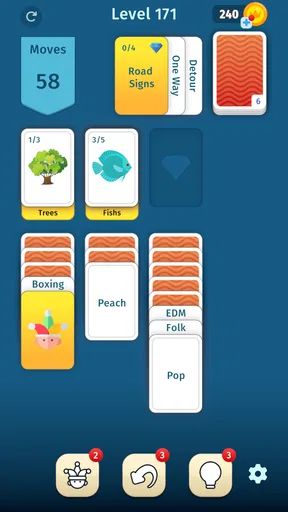
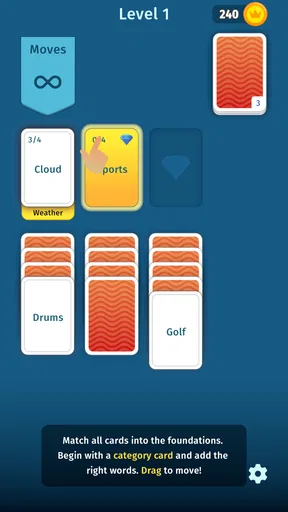
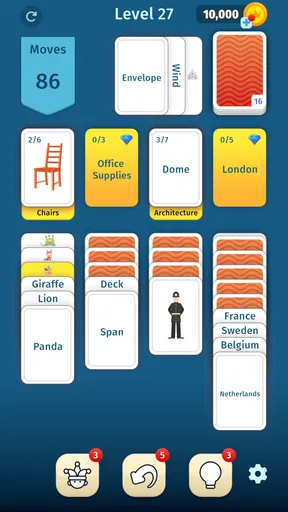
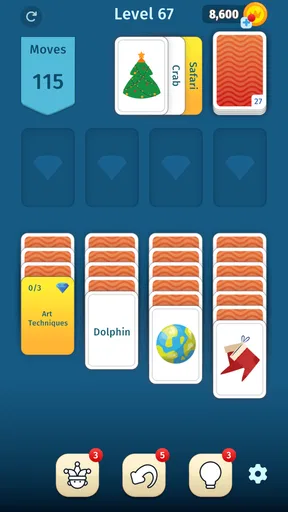
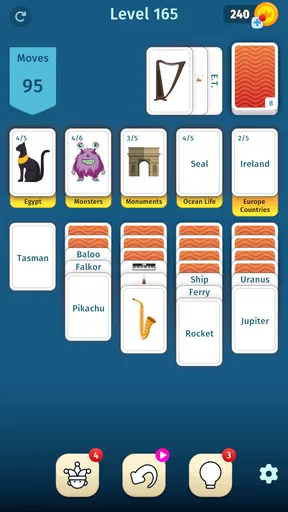
Our Review of Solitaire Word Match
 Analysis by Appyee
I found Solitaire Word Match most interesting as a small shared-device game rather than as a serious word-training tool. It combines familiar solitaire-style card play with word puzzles, so it is easy to understand when someone hands over a phone and says, “Try this one.” I tested it with the mindset of a person looking for a quiet game during short breaks, but also considered how it feels when several people in a household use the same device.
The basic appeal is immediate: players who already enjoy solitaire get a word-based change of pace, while word-game fans receive a more relaxed alternative to a strict crossword or timed spelling challenge. The game is free to install, with optional in-app purchases ranging from $1.99 to $99.99 per item. That makes the first decision simple, but shared use still deserves a little thought because a free download can become less straightforward when several people play on one phone or tablet.
How Solitaire Word Match fits into everyday shared use
My favorite scenario for this game is a household device left on a kitchen counter or coffee table. One person can play a few rounds while waiting for dinner, then pass the device to somebody else without needing a long explanation. The solitaire foundation gives the game a recognizable rhythm, and the word element creates enough variation to prevent it from feeling like a completely routine card game.
That handoff-friendly design is more useful than it may sound. A conventional word puzzle often depends on one person’s concentration, while a standard solitaire session can become repetitive for anyone watching. Here, another player can suggest a possible word, notice a useful card move, or simply take the next turn. I would not describe it as a full multiplayer experience, but it can work naturally as a pass-and-play household game when everyone understands that the device is being shared.
There is also a practical advantage for short sessions. Nobody has to commit to a long story, a complicated board, or a match against an online opponent. If I have only a few minutes, I can open the game, focus on the current puzzle, and stop when the phone needs to go back to its owner. That makes it a better fit for waiting rooms, commutes, and quiet evening breaks than games that punish interruptions.
The trade-off is that a shared-device session can blur whose progress is being changed. If two people use the same installation, the person holding the device may continue from the current state rather than starting a separate personal journey. I would therefore treat it as a communal puzzle surface, not automatically as a collection of private player spaces. Before handing it around, I would agree on a simple rule: finish the current challenge, avoid spending anything, and leave the game ready for the next person.
What the card-and-word combination feels like
The solitaire side gives the experience structure. Instead of facing an open-ended word board with no clear starting point, I have a card-game framework that guides my attention. The word puzzle then adds a second layer of decision-making. I am not only looking for a legal card move; I am also considering which letters or word possibilities may help the current situation.
That combination creates a gentler kind of tension than a fast competitive word game. I can think for a moment, test a possibility mentally, and continue without feeling that another player is waiting for me. At the same time, the word element stops the game from becoming pure card sorting. The strongest moments come when a move that looks ordinary opens a more useful word opportunity afterward.
I would not install this expecting the depth of a dedicated solitaire collection or the vocabulary challenge of a specialist word app. Its identity comes from the blend. If you want dozens of traditional card variants, a dedicated solitaire app is probably more satisfying. If you want dictionary-heavy play, a crossword, anagram, or spelling game will likely offer a sharper challenge. Solitaire Word Match sits between those choices, and that middle ground is exactly why it works for casual shared use.
Setting expectations before several people use one device
The game is listed for Everyone, which makes it approachable for a broad household audience. That label is useful when deciding whether the basic concept is suitable for a child or an older relative, but I would still look at the actual person using it. A young player may understand the cards quickly yet need help with harder words, while an older family member may enjoy the calm pace but prefer a larger screen.
The age rating should not be confused with automatic independence. A child using a parent’s phone may still be able to reach purchase prompts, and a shared tablet may contain another person’s account or payment setup. I would keep the first session supervised when the device is used by children, explain that purchases are off-limits, and make sure the owner knows who is playing. Those are sensible household boundaries even when a game itself appears harmless.
For older relatives, the main question is comfort rather than complexity. Solitaire is familiar to many people, but the word layer may require more reading and concentration. I would introduce the game with one puzzle at a time instead of explaining every possibility at once. Letting someone explore the card flow first makes the added word decisions feel less intimidating.
For a group of adults, the game can become a low-pressure conversation starter. One person can play while another suggests a word, but I would avoid treating every suggestion as a command. Part of the enjoyment comes from making the decision yourself. A useful household arrangement is to let the current player choose the move while everyone else offers hints only when invited.
Account boundaries and purchase awareness
The game is free, so trying it does not require an upfront payment. However, the presence of optional purchases means I would not assume that “free” means completely separate from household spending. The listed purchase range begins at $1.99 and reaches $99.99 per item, which is a meaningful difference depending on who owns the device and how its store account is configured.
This matters most on a family tablet that adults and children share. I would decide in advance whether purchases are allowed at all. If the answer is no, the simplest rule is not to open purchase screens and not to enter payment details during play. If the device belongs to one adult but is borrowed by others, that owner should be the only person who approves any transaction.
I also recommend separating game permission from spending permission. A child can be allowed to solve a puzzle without being allowed to buy anything. A guest can be invited to play without being given access to the device owner’s account. The game does not need to become a source of arguments if the household agrees on that distinction before the first shared session.
On a personal phone, the boundary is easier: I know which progress belongs to me and which purchases I have authorized. On a shared device, I would avoid assuming that another player understands the consequences of tapping a button. A quick explanation is enough: play is fine, but purchases require the owner’s permission. That small conversation prevents the most predictable source of friction.
Coordinating turns without pretending it is multiplayer
Solitaire Word Match works best for shared use when everyone treats it as cooperative observation rather than a formal contest. I can imagine two people sitting together, with one person holding the device and the other helping spot words. That arrangement gives the game a social quality without requiring a dedicated multiplayer mode or inventing a competitive system that is not part of its core identity.
A simple turn routine helps. The person who starts a puzzle keeps control until reaching a natural stopping point, then explains whether the next player should continue or begin again. I would not pass the device after every individual move because that interrupts the card flow and makes the puzzle harder to follow. Passing after a completed challenge, or after the current player decides to stop, feels much smoother.
For siblings or friends who like competition, the game can still support informal challenges. You might compare who finds a word first or who notices a useful move, but those comparisons should remain house rules. I would be careful not to present them as official scoring features. The fun comes from the shared puzzle, not from forcing the app to behave like a head-to-head word tournament.
Another useful approach is “hint rotation.” One player handles the cards, another looks for word possibilities, and a third person checks whether everyone agrees before the move is made. This gives younger players a role without handing them a device full-time. It also prevents the strongest player from solving everything silently. The arrangement turns a solitary game into a small group activity while preserving the game’s calm pace.
There is a downside to coordination: different players may have different ideas about the right move. Someone who enjoys experimenting may frustrate a person who prefers a careful, efficient route. I would make the current player the final decision-maker. That keeps the session friendly and avoids the feeling that the game has become a committee meeting.
How it compares with familiar alternatives
Compared with ordinary solitaire, this game gives me more to think about than arranging cards alone. The word puzzles add a reason to pause and look beyond the immediate card sequence. That makes it more engaging for people who find classic solitaire relaxing but occasionally repetitive.
Compared with crossword-style apps, it feels less demanding in one specific way: the card structure gives the session a clear path. A crossword can leave me staring at a clue with no useful entry point, while the solitaire framework keeps the interaction moving. The cost is that word enthusiasts may find the vocabulary layer less central than in a dedicated word app.
Compared with competitive word games, it is a better choice for a household where players have different skill levels. Nobody has to race an expert friend or worry about losing in public. A child and an adult can discuss a possible word together. On the other hand, players who want rankings, live opponents, or a strong sense of progression may find this style too quiet.
Compared with a large solitaire collection, the appeal is focus rather than variety. A collection is the better option if I want to switch among familiar card rules. Solitaire Word Match is the better option when I specifically want cards and words in the same session. That distinction is important because installing it for endless solitaire variety would set the wrong expectation.
Practical ways to get more from each session
I found that the best way to approach the game is to slow down before making an obvious card move. The first available action is not always the most useful one for the word side of the puzzle. Taking a brief look at the letters and the accessible cards can reveal a better sequence. This is a small habit, but it changes the game from automatic tapping into deliberate play.
When playing with someone else, I would ask for suggestions before asking for solutions. “What do you see?” creates a more satisfying discussion than “Tell me the answer.” It also makes the game suitable for mixed-age groups because a younger player can contribute a partial idea instead of needing to solve the entire word.
Another good habit is to stop at a natural break rather than abandoning the device mid-puzzle. On a personal phone, I can return whenever I want. On a shared tablet, leaving an unfinished state can confuse the next person. A quick verbal note such as “this is where I stopped” is enough to protect the household flow.
I would also keep the game in the short-break category unless I discover that its particular puzzle rhythm really suits me. Its free entry makes experimentation easy, but the optional purchase range means I would first decide whether the basic experience earns a regular place on the device. A week of casual use is more informative than buying something immediately because a difficult puzzle feels frustrating.
For children, I would turn word discovery into the main activity and avoid focusing on speed. Ask why a word fits, invite them to read it aloud, and let them make safe mistakes. For adults learning or refreshing English vocabulary, the game may be a pleasant supplement, but I would not treat it as a complete language course. Its value is in repeated exposure through play, not in replacing structured study.
Where the experience may fall short
The hybrid format will not satisfy everyone. Players who love pure solitaire may see the word layer as an interruption, while dedicated word-game fans may wish for more vocabulary depth. The game asks you to enjoy both halves. If one half is unappealing, the other may not be strong enough to compensate.
Shared use can also expose a limitation that is easy to overlook: personal boundaries are less clear when one installation sits on a common device. I would not assume that every family member receives a separate private experience. If preserving individual progress matters, each person should first decide whether the same device and game setup are suitable for that purpose.
The free model deserves attention as well. Optional purchases are not automatically a problem, but they introduce a layer that pure offline card games may avoid. Someone who wants a completely purchase-free household game may prefer a title with no transactions at all. Someone who is comfortable ignoring optional spending can try this one without paying upfront.
Finally, the game is not the right choice for a household seeking active group entertainment. It does not replace a board game, a party game, or a proper multiplayer word contest. Its strength is quieter: one screen, a few participants, and a puzzle that can be discussed without demanding constant excitement.
Device fit, trust, and who should install it
The game supports devices running Android 7.0 or later, so compatibility is reasonably broad for Android users with older hardware. I would still choose the largest comfortable screen available for shared play. A phone is fine for one person, but a tablet is easier when two or three people are looking at the cards and letters together.
The current version is 1.2.2, and the developer is One Way Street. Those details are useful when checking that the intended game is installed, especially if several similarly named word or solitaire titles appear in a search. I would use the official app-store route and confirm the developer name before installing on a shared household device.
The game has an average rating of 4.9 from around 8.2 thousand ratings, and it has passed 100 thousand installs. Those figures suggest that the concept has connected with many players, but I would still treat them as a starting point rather than a guarantee. Ratings cannot tell me whether the pace feels right for my family, whether a child will enjoy the word difficulty, or whether the purchase model fits our rules.
It was released on December 22, 2025, so I would keep expectations realistic about its place in the wider app landscape. I am more interested in whether the card-and-word combination works during actual use than in assuming that a high rating makes it universally suitable. The best test is a short, supervised session on the device that will really be shared.
My household verdict
I recommend Solitaire Word Match for people who want a free-to-start word game with a familiar solitaire backbone, especially when the same phone or tablet is used by more than one person. It is approachable, calm, and easy to turn into a cooperative activity without requiring everyone to learn complicated rules.
My recommendation comes with clear boundaries. I would not present it to children as a completely unrestricted toy because optional purchases exist. I would not promise separate private progress on a shared installation. I would also skip it if my main goal were a large library of card variants, a competitive online match, or intensive vocabulary study.
For a household, the winning formula is simple: agree who may play, decide who controls purchases, let the current player make the final move, and stop at a clear handoff point. With those expectations in place, the game becomes more than a solitary time-filler. It gives family members a reason to look at the same puzzle, suggest a word, and enjoy a few quiet minutes together.
My final view is that Solitaire Word Match succeeds because neither side completely overwhelms the other. The cards provide direction, the words provide variety, and the free entry makes it easy to see whether that balance suits you. I would install it for casual breaks and shared-device play, while choosing a dedicated alternative when I need deeper solitaire variety, stronger language practice, or formal multiplayer competition.
Verdict
Strengths of Solitaire Word Match
- Combines classic solitaire with word puzzles for varied gameplay.
- Short rounds make it easy to play during quick breaks.
- Simple controls are suitable for casual players of all ages.
- Progression and challenges provide goals beyond individual rounds.
- Offline play may be convenient when an internet connection is unavailable.
Limitations of Solitaire Word Match
- Difficulty can feel uneven as some word puzzles are much harder.
- Repeated layouts and mechanics may become predictable over time.
- Hints or extra moves may be limited without watching ads or spending currency.
- Small screens can make card and letter details harder to read.
- The game may use frequent ads between rounds or during bonus features.
Similar Picks in This Category
View All
Word Search - Word Puzzle Game
Bluetile4.8

Word Search Quest - Puzzles
Blackout Lab4.8

CodyCross: Crossword Puzzles
Fanatee, Inc.4.7

Words of Wonders: Crossword
Fugo Games4.9

Wordscapes: Word puzzle game
PeopleFun4.7

Word Search Explorer
PlaySimple Games4.9
Frequently Asked Questions
What is Solitaire Word Match?
Solitaire Word Match is a casual word and card-style puzzle game that combines familiar solitaire-inspired gameplay with vocabulary challenges. Players typically clear or match cards while forming or recognizing words, creating a relaxing experience with a little more mental variety than traditional solitaire. It is designed for short sessions, making it suitable for playing during breaks or whenever you want a simple brain-training activity.
How do you play Solitaire Word Match?
Gameplay generally involves examining the cards or letter-based elements on the board, matching valid combinations, and clearing them according to the level’s rules. You may need to plan several moves ahead because some cards or words can become blocked if selected too early. The game gradually introduces more difficult layouts and word challenges, so careful observation and a broad vocabulary can help you progress through later stages.
Can Solitaire Word Match be played offline?
Many parts of Solitaire Word Match may be playable without a continuous internet connection, which is convenient for travel or areas with limited service. However, certain features—such as advertisements, cloud synchronization, daily challenges, leaderboards, updates, or in-app purchases—may require internet access. Availability can depend on the version installed and the developer’s current settings, so it is best to check the app-store description before relying on offline play.
Is Solitaire Word Match free to download?
Solitaire Word Match is generally available as a free download, allowing users to try the core gameplay without paying upfront. Like many free mobile games, it may include advertisements, optional purchases, extra lives, hints, boosters, or other premium items. Before downloading, review the store listing for the current pricing details and check your device’s purchase settings, especially if children may use the app.
Is Solitaire Word Match suitable for all ages?
Solitaire Word Match is usually appropriate for players who enjoy casual puzzles, card games, and word-based challenges. The basic mechanics are easy to understand, although later levels may require stronger vocabulary and more strategic thinking. Parents should still review the app’s age rating, advertising, privacy information, and optional purchases before allowing younger players to use it, since these details can vary between versions and platforms.
Play our best games!


